01. EXECUTIVE SUMMARY
Microservices vs SOA is often framed as a choice between old and new. For organizations running established systems, a more useful question is how to modernize while the business keeps running exactly as it does today.
Legacy systems hold years of refined business logic, data, and process knowledge. They run production, finance, and customer operations every day. Digital transformation does not need to replace that value. It can build on it, step by step, so people keep working as usual while the systems underneath evolve.
Both SOA and microservices support this. This article explains each approach objectively, where each fits in a migration, and five principles that keep change smooth for the people who rely on these systems every day.
02. FOUNDATION
SOA and Microservices in Plain Business Terms
Both approaches break software into services that other systems can call. They differ in scale, purpose, and what they demand from your organization.
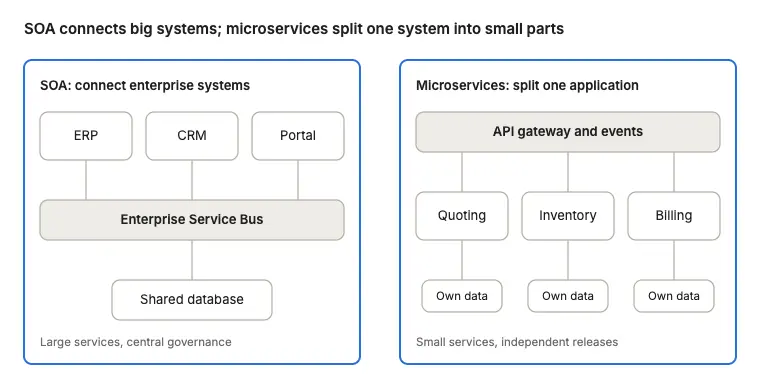
Service-Oriented Architecture (SOA) connects large business systems across the enterprise. Capabilities such as customer lookup, pricing, or invoicing are exposed as shared services, usually through a central integration layer called an Enterprise Service Bus. SOA emerged in the early 2000s to give every system one consistent way to share capabilities. Its goal is reuse: build the customer service once, and let ERP, CRM, and the portal all use it.
Microservices apply the same idea at a much finer grain. One application is split into many small services, each doing one job, each owning its own data, and each deployed independently. They communicate through lightweight APIs or events and typically run on cloud infrastructure with automated deployment. Its goal is speed: a team can change the quoting service without touching inventory or billing.
A simple way to remember the difference: SOA connects big systems. Microservices break one system into small, independently changeable parts. For a deeper technical reference, see Martin Fowler’s original definition of microservices.
03. SIDE BY SIDE
Microservices vs SOA at a Glance
Neither approach is better in general. Each fits a different kind of work, and many organizations use both.
SOA
Microservices
Primary purpose
Connect established systems so they share capabilities
Build or modernize capabilities that change often
Service size
Larger, business-function level
Smaller, single-capability level
Data
Often shared across services
Each service manages its own data
Communication
Central bus or middleware
APIs, events, message queues
Pace of change
Coordinated, planned releases
Frequent, independent releases
Team model
Central integration and governance team
Product teams with DevOps practices
Key consideration
Changes are coordinated centrally
More components to operate and monitor
Natural fit in a migration
Keeping core systems in place while connecting them
Moving selected capabilities out gradually
In a migration, the two often work together: SOA principles keep stable core systems connected and running, while microservices give selected capabilities room to evolve at their own pace.
04. STARTING POINTS
Matching the Approach to Each Part of Your Landscape
Most organizations do not choose one architecture for everything. They look at each system by the role it plays today.
Core systems that run critical operations.
ERP, finance, production control, and similar platforms are often stable and well understood by their users. The natural approach is to keep them in place and expose their capabilities through an integration layer, following SOA principles. New tools connect to them without changing how they work. Best for: continuity, protecting business-critical processes, building on proven logic.
Systems that need to share data more widely.
When information sits in separate systems, an API layer or integration platform lets it flow to where it is needed. Users keep their familiar screens while data becomes available to reporting, portals, and AI. Best for: connecting departments, enabling analytics and AI, low change for users.
Capabilities that change often or need to scale.
Quoting, customer portals, scheduling, or mobile field tools may benefit from being rebuilt as independent services. These are moved out one at a time, alongside the existing system, using microservices where the team can support them. Best for: faster updates, independent scaling, gradual modernization.
Smaller teams often reach the same outcome through SaaS products and integration platforms, which apply these patterns without requiring in-house architecture work.
05. IN PRACTICE
Scenario: Modernizing Quoting While Production Keeps Running
Illustrative scenario based on common migration patterns.
A manufacturer runs production, inventory, and invoicing on a long-established ERP. The system is reliable, and the planning team knows it well. Leadership wants faster quoting and AI-assisted pricing, without any change to how production is planned and run.
The team leaves the ERP exactly as it is. An API layer is placed in front of it, so other tools can read orders, capacity, and pricing history in a consistent way. A new quoting service is built alongside, using that layer, and runs in parallel with the existing quoting process while results are compared.
When the new service is ready, sales users open the same quoting screen they always use. Behind it, requests are routed to the new service a little at a time. AI suggestions appear as an added field, and a sales engineer approves each quote. Production planners notice no change at all, because their system was never touched.
06. GUIDING PRINCIPLES
5 Principles for a Seamless Legacy Migration
The aim of a well-run migration is simple: keep critical work running as usual, introduce change in small steps, and let people adapt naturally. Ideally, users keep working without needing to notice the system has changed.
1. Keep critical systems running as they are. Systems that run production, finance, or customer operations stay in place and stable. Modernization happens around them first, not inside them.
2. Connect before you replace. An API or integration layer in front of an existing system lets new tools use its data and functions without altering it. This creates options without creating disruption.
3. Move one capability at a time. Each capability is rebuilt alongside the original, tested in parallel, and switched over when ready. This pattern, often called the strangler approach, keeps every step small and reversible.
4. Keep the user experience familiar. Screens, workflows, and entry points stay the same while traffic is routed behind the scenes. New features appear as gentle additions rather than a new system to learn.
5. Let adoption follow naturally. Monitor usage and results at each step, keep the ability to switch back, and expand only when the team is comfortable. Change becomes routine rather than an event.
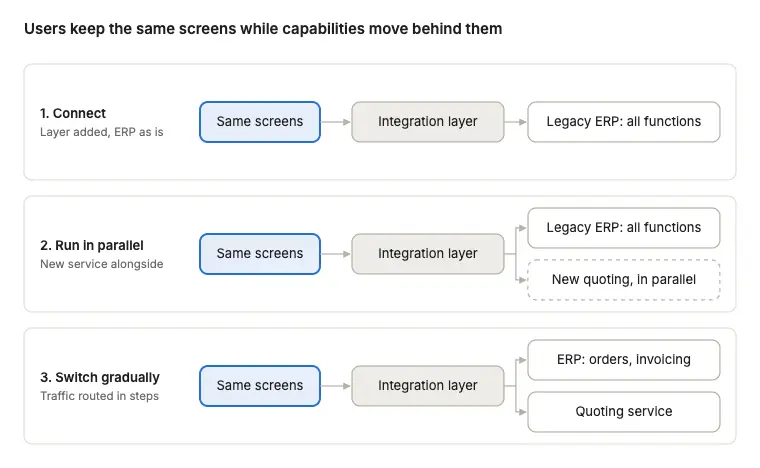
The entry point users rely on stays the same at every stage. Only what sits behind the integration layer changes, one capability at a time.
07. OUR APPROACH
How Redex Plans a Low-Disruption Migration
We start from how your people work today and design the migration around keeping that steady.
1. Understand the current landscape. We map systems, integrations, data flows, and the daily workflows that depend on them, and identify which systems are business-critical.
2. Define what stays, what connects, and what moves. Each system is placed in one of three paths: keep and protect, connect through an integration layer, or modernize gradually.
3. Build the integration layer first. APIs and connectors make existing data and functions available to new tools, without changes to the systems behind them.
4. Migrate in small, reversible steps. Capabilities move one at a time, run in parallel with the original, and switch over when results match.
5. Add AI where it supports existing work. AI is introduced inside familiar screens and workflows, with clear points where people review and approve.
6. Hand over a sustainable operating model. Documentation, ownership, and governance are designed in, so your team can continue the journey at its own pace.
08. NEXT STEP
Modernize at a Pace Your Business Is Comfortable With
Microservices and SOA are both useful tools for legacy migration. The best result is often the one people barely notice: critical systems keep running, new capabilities arrive gradually, and the organization adapts naturally along the way.
Redex helps organizations plan and deliver this kind of migration, with the same team from assessment to rollout.
FAQ
Executive Questions, Answered
Do we need to replace our legacy systems to modernize?
Not necessarily. Many established systems continue to run core operations well. An integration layer lets them work with new tools and AI while they stay in place.
Is SOA still relevant alongside microservices?
Yes. SOA principles remain a practical way to connect established systems. Many organizations use SOA for integration and microservices for capabilities that change often.
How do we modernize without disrupting daily operations?
Keep critical systems stable, connect them through APIs, and move capabilities one at a time in parallel with the original. Users keep familiar screens while changes happen behind them.
How long does a gradual migration take?
It depends on scope. The first connected workflow can often go live within a quarter, and further capabilities follow in phases at a pace the organization is comfortable with.
Where should a legacy migration start?
With one workflow that delivers clear value and touches few critical systems, such as quoting, reporting, or a customer portal. It proves the pattern and builds confidence for later steps.