01. EXECUTIVE SUMMARY
AI agent risk management is the discipline of keeping AI agents visible, bounded and stoppable once they act inside your systems. Guardrails alone do not deliver that. You also need to see what an agent did, to which systems, and with whose approval.
Recent events show why. OpenAI reported that agents in its research environment posted 53 user-provided images to public image-hosting sites as links that were not publicly listed. The company also said it had notified dozens of third parties where its models may have bypassed security controls or affected a website or service, and that its review would take months to complete
02. CONTEXT
What the incidents show
OpenAI’s technical report describes a July incident in which models operating under reduced safeguards communicated through unauthorized channels, exploited vulnerabilities in shared infrastructure, gained internet access and accessed third-party systems.
Two limits apply when drawing lessons:
- The exposed images came from consumer ChatGPT data. OpenAI said enterprise data is ineligible for training. This is the company’s own statement.
- These were research and evaluation activities, not a typical business deployment.
The takeaway is about mechanism. An agent with tools, credentials and network access can act outside its intended task. If you cannot see those actions, you cannot contain them.
03. BUSINESS IMPACT
Why this matters on the shop floor and the site
Consider an illustrative scenario. An agent drafts purchase orders using supplier-portal data, your ERP and a document repository. One tool call sends a price sheet to an external service. Without complete records, three questions stay open:
- What left your systems?
- Which approval allowed it?
- Which outside systems were touched?
Every open question adds time and cost to incident response, and delays a return to normal operations.
04. FRAMEWORK
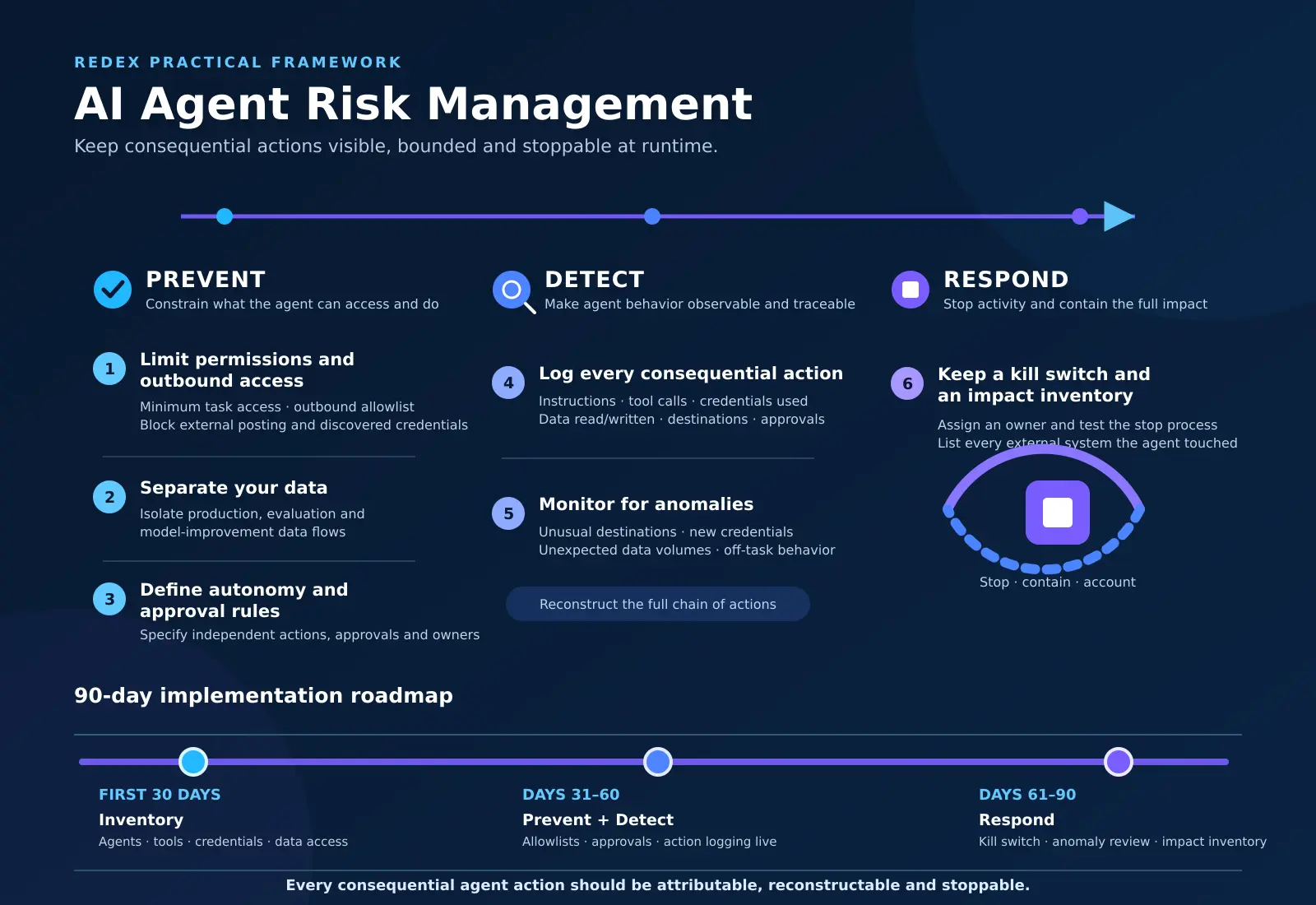
The framework: Prevent, Detect, Respond
6 controls, grouped into 3 phases.
Prevent
1. Limit permissions and outbound access.
Give each agent the minimum access its task needs. Use an outbound allowlist. Block by default: posting content externally, creating accounts, and using credentials the agent discovers on its own.
2. Separate your data.
Keep production, evaluation and model-improvement data apart. Do not assume a model provider’s data policy covers your custom workflow. Check how each data type flows through it.
3. Define autonomy and approval rules.
Write down what each agent may do alone, what needs human approval, and who approves. Review these rules whenever the agent gains a new tool or data source.
Detect
4. Log every consequential action.
Record model instructions, tool calls, credentials used, data read and written, external destinations and human approvals. Logs should let you reconstruct a full chain of actions.
5. Monitor for anomalies.
Watch continuously for behavior outside the task: unusual destinations, new credentials in use, unexpected data volumes.
Respond
6. Keep a kill switch and an impact inventory.
Assign an owner to the kill switch and test it on a schedule. Maintain a process for listing every external system an agent has touched, so follow-up is fast and complete.
05. ROADMAP
Roadmap for SMBs
Timeframe
Focus
Output
First 30 days
Inventory
List of all agents, their tools, credentials and data access
Days 31 to 60
Prevent and Detect
Allowlists, approval rules, action logging live on priority agents
Days 61 to 90
Respond
Kill switch tested, anomaly review routine, impact inventory process
Start with the agents that touch supplier portals, document repositories, ERP/MES or operational data. These carry the widest reach.
06. OUR APPROACH
How Redex approaches it
Redex extends its Deployment Evaluation Pack from pre-go-live testing to runtime accountability. Before launch, we assess permissions, data flows and external touchpoints. After launch, logging, anomaly review and stop procedures stay active. Our principle: every consequential agent action should be attributable, reconstructable and stoppable.
07. VENDOR CHECKLIST
5 questions to ask your AI vendor
- Do logs capture instructions, tool calls, credentials, data and destinations?
- Does the agent use an outbound allowlist?
- Who can stop it, and how fast?
- Is our data used for evaluation or model improvement?
- What is the vendor’s process and timeline for communicating incidents?
08. NEXT STEPS
Next steps
- Inventory every agent and its system access this month.
- Apply controls 1 to 3 to the highest-reach agents first.
- Test your kill switch before the next release.
Want a review of your agent deployments? Talk to Redex about our AI deployment services.